Thursday, July 18, 2019

How to Create a Powershell Gui |Step-By Step

Running a Powershell script behind a  user friendly Gui is a great experience .

Here we learn the step by step process to create a Powershell Gui form.To create Gui in Powershell the first thing we need to learn how to create a form.


###########################  Load form System Assembly #############################
[reflection.assembly]::LoadWithPartialName( "System.Windows.Forms") | Out-Null 

############################ Create the form ######################################

$form = New-Object Windows.Forms.Form 

#################### Provide the Form Size --Width and Height##########################

$Form.ClientSize                 = '400,400'
#################################Name of the form ################################

$Form.text                       = "My Form"

###############################Add Show dialog ##################################

$form.ShowDialog() 

###############################################################################

Open powershell.Exe and run the above code to open the powershell gui form


Here we go ...!


Now we learned how to create form ..Next we are going to learn how to add controls over the form

Continue........!


Keep Watching ..


Friday, March 8, 2019

PowerCli -Command to Get Snapshot details from vCenter


PowerCli -Command to Get Vmware Snapshot details from vCenter


Get-vm | Get-snapshot |Select-Object Vm,Name,Created,SizeGB


Regards
Bijesh 

Tuesday, April 24, 2018

Powershell-Command to Copy data from one location to another

Command to Copy data from one location to another

Copy-Item \\server11\c$\temp\test.exe -Destination \\server12\c$\ -ErrorAction silentlycontinue


Regards
Bijesh

Command to get "Password last set,Last logon " Dates for a local User account

Command to get "Password last set,Last logon " Dates for a local User account

For Local System Account,

Net user <Username>

For Domain User Account ,

Net User <Username>  /Domain


Regards
Bijesh

Sunday, April 22, 2018

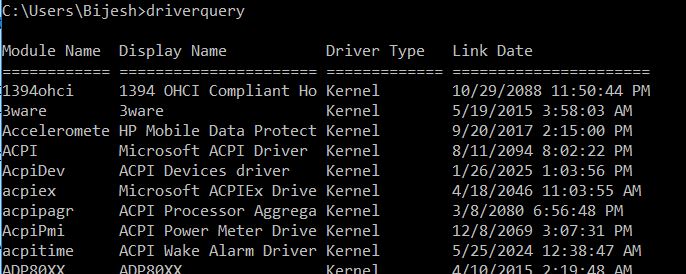
Command to list all drivers details in a system

Driver query is a simple Command to list all drivers details in a system.


Regards
Bijesh

Wednesday, April 18, 2018

Command to enable-ping-response-on-windows

netsh advfirewall firewall add rule name="ICMP Allow incoming V4 echo request" protocol=icmpv4:8,any dir=in action=allow

Regards
Bijesh

Powershell -To get List of Windows servers from Active Directory

Get-ADComputer -Filter { OperatingSystem -Like '*Windows Server*' } -Properties OperatingSystem | Select Name,OperatingSystem 


Regards
Bijesh

Vmware launched VMware vSphere 6.7

https://blogs.vmware.com/vsphere/2018/04/introducing-vmware-vsphere-6-7.html

Regards
Bijesh

Monday, March 26, 2018

Horizon view | Powercli command to get the number of VM's in all pool

This  is a Horizon view  Powercli command to get the number of VM's in all available pool with status connected/disconnected.


Get-Pool | %{
   $remote = Get-RemoteSession -Pool_id $_.Pool_id
   $_ | Select @{N="Name";E={$_.Pool_id}},
     @{N="VM in pool";E={Get-DesktopVM -Pool_id $_.Pool_id | Measure-Object | Select -ExpandProperty Count}},
     @{N="Connected";E={$remote | where {$_.State -eq "CONNECTED"} | Measure-Object | Select -ExpandProperty Count}},
     @{N="Disconnected";E={$remote | where {$_.State -eq "DISCONNECTED"} | Measure-Object | Select -ExpandProperty Count}}
 }


Regards
Bijesh

Sunday, March 25, 2018

Power shell Script to get Server reboot history

Being an Admin we may wanted to get server reboot history.We can get it through event viewer and look for event 1024.But how to filter only the reboot events.This powershell script helps to filter logs from remote system and get the desired output


Get-WinEvent -cn <Computer> -FilterHashtable @{logname='System'; id=1074}  | ForEach-Object {
$ev = New-Object PSObject | Select-Object Date, User, Action, Process, Reason, ReasonCode, Comment
$ev.Date = $_.TimeCreated
$ev.User = $_.Properties[6].Value
$ev.Process = $_.Properties[0].Value
$ev.Action = $_.Properties[4].Value
$ev.Reason = $_.Properties[2].Value
$ev.ReasonCode = $_.Properties[3].Value
$ev.Comment = $_.Properties[5].Value
$ev
} | Select-Object Date, Action, Reason, User


Regards
Bijesh

vSphere 6.5 topology and upgrade Planning Tool

Vmware tool for vSphere 6.5 topology  and upgrade Planning

https://vspherecentral.vmware.com/path-finder/


Regards
Bijesh

Saturday, March 24, 2018

Horizon view | Powercli command to get the Connected user’s list


Get-RemoteSession -State Connected |Select DNSName,Username

Regards
Bijesh

Horizon view | Powercli command to get the list of unassigned VM's


With View powercli command we can pull the list of unassigned vm's .Below is  the onliner to save the list of unassigned vm list  to C drive


Get-Pool | Select Pool_id, @{Name="Unassigned VMs";Expression={($_ | Get-DesktopVM | ? {$_.user_displayname -eq "$null"})} |Out-File c:\VMlist.txt


Regards
Bijesh

Horizon view | Powercli command to get the number of unassigned VM's


Get-Pool | Select Pool_id, @{Name="Unassigned VMs";Expression={($_ | Get-DesktopVM | ? {$_.user_displayname -eq "$null"}).Count}}


Regards
Bijesh

PowerCli -To get average cluster resources usage Report

This is a simple command to get the report  on vcenter cluster Resource usage for last 3 Days


Get-Cluster| Select Name, `
@{N="CPU Usage (Average), Mhz" ; E={[Math]::Round((($_ | Get-Stat -Stat cpu.usagemhz.average -Start (Get-Date).AddDays(-3) -IntervalMins 5 | Measure-Object Value -Average).Average),2)}}, `
@{N="Memory Usage (Average), %" ; E={[Math]::Round((($_ | Get-Stat -Stat mem.usage.average -Start (Get-Date).AddDays(-3) -IntervalMins 5 | Measure-Object Value -Average).Average),2)}} , `
@{N="Network Usage (Average), KBps" ; E={[Math]::Round((($_ | Get-Stat -Stat net.usage.average -Start (Get-Date).AddDays(-3) -IntervalMins 5 | Measure-Object Value -Average).Average),2)}} , `
@{N="Disk Usage (Average), KBps" ; E={[Math]::Round((($_ | Get-Stat -Stat disk.usage.average -Start (Get-Date).AddDays(-3) -IntervalMins 5 | Measure-Object Value -Average).Average),2)}} |ft


Regards
Bijesh

Power Shell Command To Get Print Queue

To Get Print Queue from a remote print server


Get-WMIObject Win32_Printer -ComputerName <PrintServerName> |Format-Table -AutoSize


Regards
Bijesh

Sunday, December 10, 2017

How to copy from All members in a ADGroup to Another

How to copy from All members in a  ADGroup  to Another


Get-ADGroupMember -Identity 'Old Group' | ForEach-Object {Add-ADGroupMember -Identity 'New Group' -Members $_.distinguishedName}

Regards
Bijesh

Sunday, November 12, 2017

How to get list of empty groups in active directory

     When we do cleanup activity in Ad,we might wanted to check if any empty groups exist's.How to get the list of empty groups in Ad ?

We can get the list easily with help of Active  directory power shell .Below is the one-liner command to pull the information

Get-ADGroup -Filter * -Properties Members | where {-not $_.members} | select Name | Export-Csv C:\ADemptygroupLIST.csv –NoTypeInformation

Regards
Bijesh
Blog4IT

Wednesday, November 8, 2017

Command To Get the list of Active directory users with account expire date

DSQUERY Command To Get the list of  Active directory users with account expire date

dsquery user -name * -limit 0 | dsget user -samid -acctexpires


Regards
Bijesh

Command to add DNS record

Simple Command to Add add DNS record

Dnscmd  ServerName /recordadd  <DomainName> HostEntry A <x.x.x.x>

Regards
Bijesh